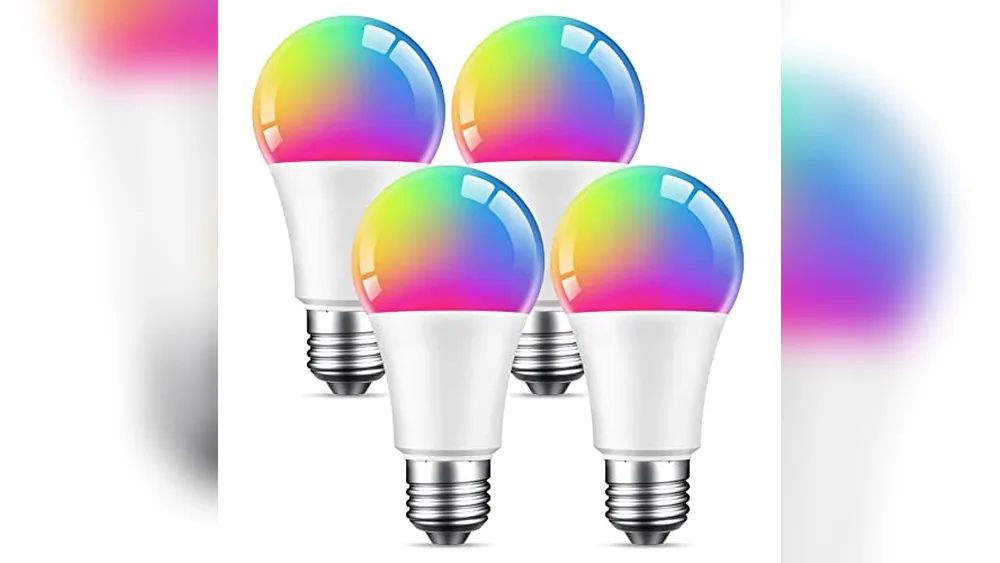
Please note: this article contains Amazon affiliate links. As an Amazon Associate, a commission may come our way if you buy, and it never comes out of your pocket. Govee Smart Light Bulbs Review are designed to offer flexible illumination for your living space, focusing on color customization and automated control.
These bulbs provide 16 million colors and 54 preset scene modes, allowing users to adjust the lighting to match specific moods or environments. With an output of 800 LM and a standard E26 base, they are built to fit common household fixtures while delivering a versatile, color-changing experience across a working voltage of AC 120V.
These bulbs are intended for homeowners who want to integrate lighting into their daily routines through app-based management and voice commands. By connecting to a 2.4GHz WiFi network, they allow for group control of multiple devices, scheduling, and music synchronization that reacts to sound via a phone microphone. While they offer significant control, a potential owner should note that they require a stable wireless connection and are not compatible with smart switches, which is a trade-off that will be explored further in the following sections.

Choosing the Right Smart Lighting Setup
Govee Smart Light Bulbs suit individuals comfortable managing home devices through mobile applications. If you enjoy customizing your environment, the 54 preset scene modes allow you to shift the atmosphere of a room instantly. These bulbs are an excellent choice for users who want to link their lighting to specific times of day, such as using the sunrise and sunset modes to mimic natural light cycles in bedrooms or living areas. Because the system supports group control, it works well for anyone planning to outfit an entire room or multiple fixtures with synchronized colors.
Before buying, check your router settings. These bulbs require a stable 2.4GHz WiFi connection. If your home network operates exclusively on a 5G frequency, the bulbs will not connect. You must ensure your router broadcasts a 2.4GHz band to maintain a reliable link.
Avoid these bulbs if your home is wired with smart switches. The manufacturer specifies they cannot be used with such hardware. If you rely on physical wall dimmers or specialized smart switches, look for lighting solutions that explicitly state compatibility with those electrical configurations.
Finally, consider your phone usage for the music sync feature. The bulbs change color and brightness based on sounds detected by your phone microphone. This only works when the microphone is not occupied by another app. If you frequently use your phone for calls or voice memos, the sync feature may be interrupted. Always verify your existing home network and switch setup before committing to this model to ensure a smooth installation.
Features for Home Lighting Control
The Govee Smart Light Bulbs provide a range of tools to manage your home lighting, focusing on ease of use and environmental customization.
Customizing Your Atmosphere
With 16 million DIY colors available, you can tailor your lighting to suit specific activities or moods. The 54 preset scene modes act as a quick way to change the look of a room without needing to adjust individual color settings manually. Whether you want to brighten a workspace or create a softer, more relaxed environment for the evening, these presets provide a wide variety of options. The manufacturer specifies these bulbs deliver 800 LM, which affects how much light is produced in a given area.
Automated Daily Routines
The timer and scheduling features allow you to integrate your lighting into your existing lifestyle. You can set the bulbs to wake you up with a gradual increase in brightness or dim them as you prepare to sleep. These functions are designed to automate your home environment, reducing the need to manually toggle switches throughout the day. By creating a consistent schedule, you ensure your lighting responds to your needs without constant interaction.
Integrated Smart Functionality
These bulbs support voice commands and app-based control, allowing for hands-free adjustments. The music sync function is a notable addition, as it enables the bulbs to change brightness and color when the microphone on your phone detects sound. It is important to remember that this feature only functions when the microphone is not occupied by other tasks. The Govee Home App serves as the primary hub for these settings, enabling you to group multiple devices together for simultaneous control.
| # | What Amazon lists |
|---|---|
| 1 | 16 Million DIY Colors: Govee smart light bulbs offer millions of colors and 54 preset scene modes. You can explore your favorite one or pick one that suits your mood best, bringing you a really fantastic lighting experience(Working Voltage: AC 120V). |
| 2 | Music Sync: Our smart light bulbs change color and brightness simultaneously when sounds are detected by the microphone on your phone. Note: only works when the microphone is not occupied. Download the Govee Home App and enable microphone permissions. |
| 3 | Smart Control: Govee color-changing light bulbs make it possible to control your bulbs with simple voice commands. And you’d also feel free to turn your smart light bulbs on/off, adjust brightness, or change the colors, set scenes via Govee Home App. (Note: Doesn’t support 5G) |
| 4 | Group Control: Simplify daily setups by grouping smart bulbs & Govee devices. Create a scheme, add devices, and control them simultaneously. Ensure bulbs are on stable 2.4GHz WiFi for optimal experience. Please note: This A19 smart bulb cannot be used with smart switches. |
| 5 | Timer and Schedule: Applying the ceiling fan light bulbs to your daily routine now is easier than ever, with timer function and modes like Sunrise & Sunset, you can set your bulbs to brighten when you wake up and gradually dim when you fall asleep. |
Pros and Cons of Govee Smart Light Bulbs
Pros
- 16 million DIY colors for custom lighting
- 54 preset scene modes for atmosphere
- Music sync reacts to detected sounds
- Group control for multiple connected devices
- Timer and schedule functions for routines
Cons
- Does not support 5G networks
- Cannot be used with smart switches
- Requires microphone access for music sync

Is This Lighting Upgrade Worth It?
The Govee Smart Light Bulbs are a strong choice for anyone looking to add color and automated scheduling to their home without the complexity of a full smart home hub. If you have a stable 2.4GHz WiFi connection and standard, non-smart switches, these bulbs are easy to manage through the provided application. They are especially useful for those who want to create specific scenes for different times of the day, such as the sunrise and sunset modes that help regulate your home’s lighting based on your natural routine.
If your home infrastructure relies on 5G or smart switches, this product will not meet your needs. These bulbs cannot be used with smart switches. Always verify your router settings before purchase, as the bulbs are incompatible with high-speed 5GHz bands.
The main trade-off is the reliance on the Govee Home App for full functionality. To use the music sync feature, ensure your phone’s microphone is not occupied by another active process. If the app lacks microphone permissions, the bulbs will not react to sound.
For those who meet these requirements, the ability to group devices provides a significant upgrade over static bulbs. You can create a single scheme to control multiple lights simultaneously, simplifying your daily routine. With 16 million colors and a wide variety of lighting effects available, you can tailor your environment to your specific mood. For the best experience, keep your devices on a stable network to ensure the timer and schedule functions remain reliable throughout the week.
Frequently Asked Questions: Govee Smart Light Bulbs Review
Do I need a special bridge or hub to use these bulbs?
No, these bulbs do not require a separate bridge or hub. They connect directly to your home WiFi network. You only need to ensure that your router is broadcasting on the standard frequency band, as the bulbs are not designed to function on 5G networks. Once connected, you manage everything through the app on your phone.
Can I use these bulbs in an outdoor fixture?
The manufacturer does not provide information regarding outdoor use or weather resistance. Check the product packaging or the official documentation before installing them in an exposed, outdoor, or damp environment.
Will these bulbs remember my settings after a power outage?
The listing does not state whether these bulbs retain their specific color or brightness settings after a power loss. It is common for smart bulbs to default to a standard white light state when power is restored, but you should confirm this behavior in the app settings or manufacturer support pages if consistent state-retention is essential for your setup.
What is the expected lifespan of these bulbs?
The listing does not state a specific hour count for the lifespan of these bulbs. While many LED products have a long operational life, you should not assume a specific number of years or cycles without explicit confirmation from the manufacturer. Always follow standard handling practices to ensure the best possible durability for your lighting equipment.
Are these bulbs compatible with all voice assistants?
The listing mentions that the bulbs support simple voice commands, but it does not list every specific voice assistant platform. While they are designed for smart control, ensure that your preferred assistant is compatible with the Govee Home App before purchasing if you plan to rely exclusively on voice-based operation for your daily lighting needs.