Best program for designing posters and easy to use to make posters. There are a lot of choices, but two programs stand out for their ability to make custom print projects and large clip art collections. These tools are made for different creative needs and ways of working.
The main difference is that one is a design program with a lot of project tools, while the other is a high-quality clip art collection that goes well with design work.
You will be able to choose the best program for your poster design needs after reading this.
Picking the Right Tool for Your Poster Projects
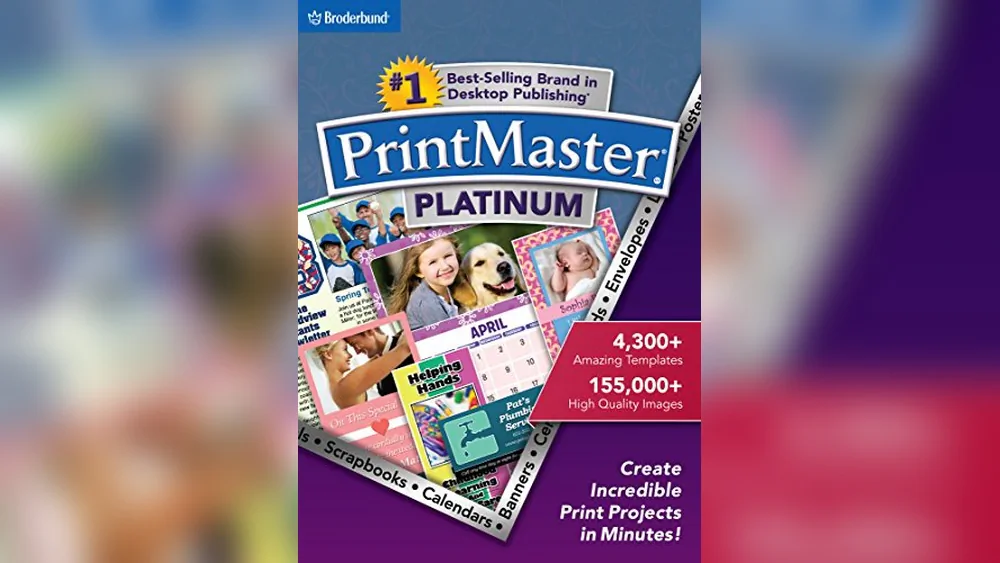
- PrintMaster Platinum is the best all-in-one design software for posters, cards, and flyers.
- Choose Creative Memories Art Collection when you need a lot of clip art to make your posters look better.
- PrintMaster Platinum is a good choice for people who like a modern interface with built-in tools for photos and text.
- If you already use design software that works with Creative Memories Art Collection, this is a great way to get more images.
- PrintMaster Platinum is the best choice for projects with multiple pages that need to look the same.
Daily Use of Poster Design Software
When you use PrintMaster Platinum, you work with an easy-to-use interface that makes making posters, flyers, and other print projects easier. I like that it has a lot of different fonts, brushes, and layouts to choose from, which makes designing things every day easy.
When I want new clip art to use on posters or scrapbooks, I find Creative Memories Art Collection to be very helpful. It works well with other programs, so I can easily import images without having to stop what I’m doing.
A Quick Look at Printmaster Platinum Design Software

Where PrintMaster Platinum Works The Best
- Making print projects with more than one page, like flyers and posters.
- Using a lot of different paint brushes and fonts.
- Designing with a user interface that is easy to understand and up-to-date.
- Managing address books and mailing lists for projects.
Where PrintMaster Platinum Doesn’t Work Well
- Only available on PCs.
- Doesn’t come with a lot of clip art besides the built-in images.
- Not a place to get clip art for other programs.
A Quick Look at the Creative Memories Premium Art Collection

Where the Creative Memories Art Collection Goes The Best
- Adding more than 12,500 royalty-free clip art images to designs.
- You can use images for both personal and business projects without any limits.
- It works with a number of home publishing programs, such as PrintMaster.
- Designing for holidays, special events, and everyday life.
Where the Creative Memories Art Collection Falls Short
- Not a design program on its own; needs other programs to work.
- Costs more than basic design tools.
- Mainly focused on clip art instead of layout or text tools.
Looking at the differences between poster design and clip art needs
I learned that PrintMaster Platinum has everything you need to design posters with layout and text controls by using it every day. In the meantime, Creative Memories Art Collection is great for adding a lot of clip art to designs. Depending on how you work, each tool helps with making posters in its own way. In my comparison, I looked at usability, variety of content, and how well the two worked together.
How simple is it to start designing?
PrintMaster Platinum’s modern interface and templates make it easy to start a project. You need design software to import images into the Creative Memories Art Collection.
| Part | Platinum PrintMaster | Art Collection from Creative Memories |
|---|---|---|
| Simple to start | Includes tools and templates | Needs software that works with it |
| Interface for users | New and stylish | Not relevant |
| Learning is necessary. | Not too much | Very little for image use |
| Making a project | Possible right away | Indirectly, through import |
Scores: PrintMaster Platinum: 7 out of 10 | Creative Memories 6 out of 10 for the art collection
Edge: PrintMaster Platinum is better for people who want a design tool that can do everything from start to finish.
What about different kinds of content for posters?
PrintMaster Platinum has more than 10,000 pictures and a lot of different fonts. The Creative Memories Art Collection has more than 12,500 clip art images.
| Part | Platinum PrintMaster | Art Collection from Creative Memories |
|---|---|---|
| Number of images | More than 10,000 images that don’t cost anything | More than 12,500 images that are free to use |
| Choices for fonts | Fonts and styles for photos and text | None were included |
| Focus on the image | Different images for print projects | Clip art for parties |
| For business use | Allowed | Allowed |
| Limitations on images | Part of the software | Collection on its own |
Scores: PrintMaster Platinum: 7 out of 10 | Creative Memories Art Collection: 7 out of 10
Edge: Creative Memories Art Collection is good for people who need a wide range of specialized clip art.
How do the different programs work with other tools?
PrintMaster Platinum is a stand-alone program that comes with built-in project management. Memories that are creative Art Collection is made to work with other home publishing programs.
| Part | Platinum PrintMaster | Art Collection from Creative Memories |
|---|---|---|
| Independence from software | Design software that works on its own | Needs other software |
| Working together | Self-sufficient | Works with PrintMaster and other programs |
| Managing a project | Has a master project page | Not a single one |
| Easy to import and export | For your own use | Design apps with ease of import |
Scores: Creative Memories: PrintMaster Platinum – 8/10 6 out of 10 for the art collection
Edge: PrintMaster Platinum is a better choice for people who want everything in one program without having to buy extra software.
What are the things to think about when it comes to price?
As a full design tool, PrintMaster Platinum is reasonably priced. Creative Memories Art Collection costs more because it has a lot of clip art.
| Part | Platinum PrintMaster | Art Collection from Creative Memories |
|---|---|---|
| Price point | Around $39.99 | Around $99.99 |
| Value of design tools | Has software and pictures | Only clip art |
| Justifying the cost | Great for big projects | Good for a lot of clip art needs |
Scores: Creative Memories: PrintMaster Platinum – 8/10 Art Collection: 5/10
Edge: If you need both software and images, PrintMaster Platinum is a better deal.
Long-Term Use and Dependability in Poster Design
There is a learning curve with PrintMaster Platinum, but the tools are always the same, which builds trust over time. It has built-in features that make it easy to manage different print projects without having to switch programs. Users can count on controls they know and a steady flow of work.
Once you have the right software, using the Creative Memories Art Collection is easy. Its huge library of images is a reliable source for creative needs that come up all the time. You can trust the clip art because it is royalty-free and can be used in many ways, but you do need design software to use it.
Picking the best program for how you make posters
If you want a full design program that can make posters from start to finish, PrintMaster Platinum is the best choice. It’s useful for people who want an all-in-one program with a lot of project management tools.
Creative Memories Art Collection is great for designers who already use home publishing software and want to add more clip art to their posters. It works well for people who want to add variety to images instead of running the whole design process.
You can choose between the two based on whether you need a full design program or a large collection of clip art.
Questions and Answers About the Best Program for Making Posters
Can I use PrintMaster Platinum to make posters for businesses?
Yes, PrintMaster Platinum comes with images that don’t cost anything and can be used for business. You can use it to make posters that you can give away or sell.
Does Creative Memories Art Collection work with other design programs?
Yes, it works with a number of home publishing programs, such as PrintMaster. You bring the clip art into the program you like best.
Do I need to know how to use PrintMaster Platinum?
The interface is modern and easy to use, but it helps to know a little about design. It has tools that help both new and experienced users.
Are there fonts or text tools in the Creative Memories Art Collection?
No, it only has clip art images. You will need different design software for fonts and text features.
Which program is better for making posters that are more than one page long?
With its master project page feature, PrintMaster Platinum can handle projects with more than one page. Creative Memories is a collection of clip art, not a page manager.
Are the pictures in the Creative Memories Art Collection free to use for business?
Yes, all of the pictures are free to use for personal or business purposes without any restrictions.
Can I test these programs before I buy them?
The product details do not say anything about trials. You may be able to find more information by looking at product pages on Amazon.